

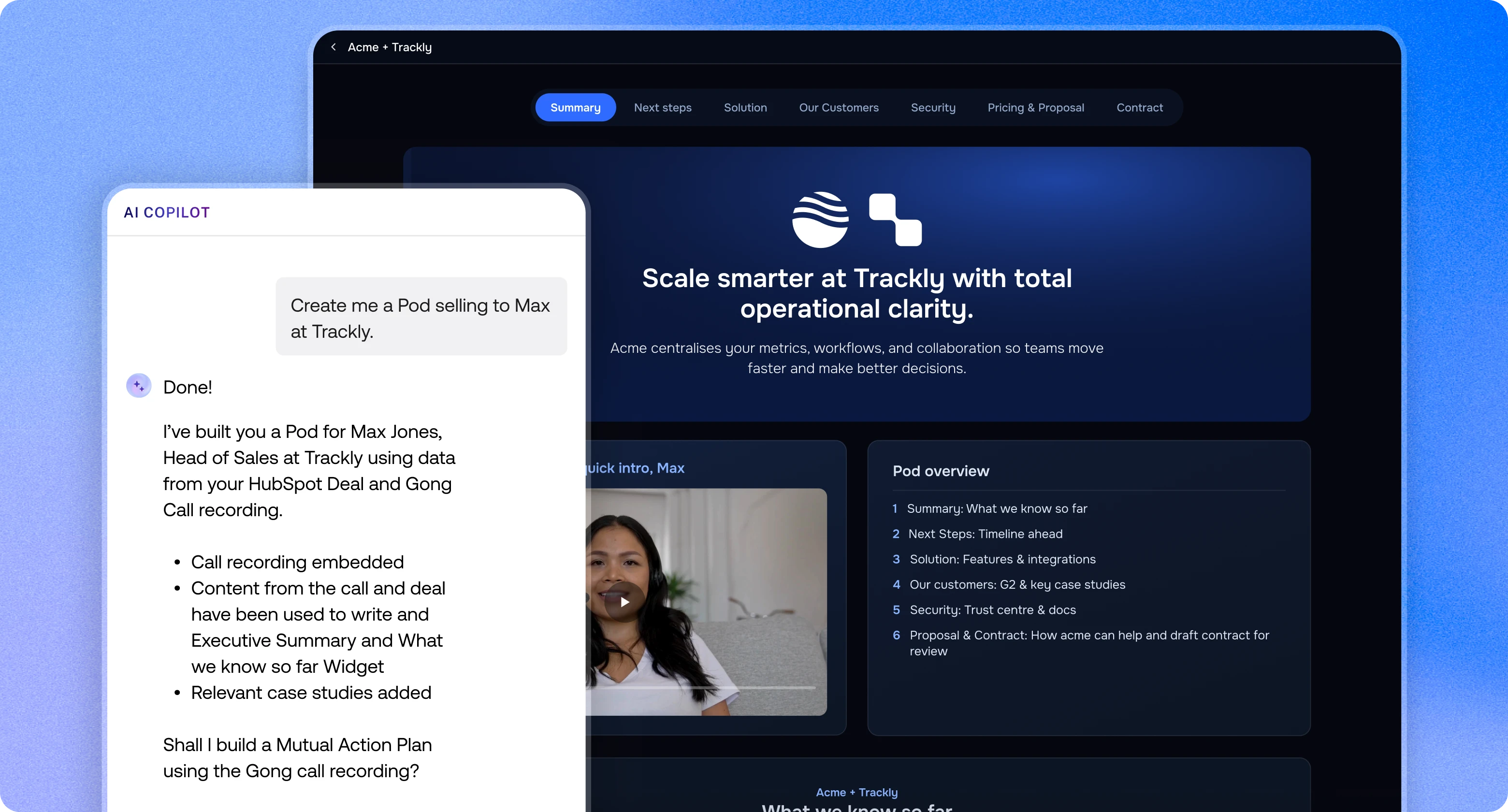
See trumpet in action
Explore tours of every part of the platform,
at your own pace.



vs

trumpet vs Aligned
Aligned is quick to start. Trumpet gives you fully branded Pods, governance your ops team can rely on, engagement scores on every viewer and agents that act on every deal.

#1 Digital Sales Room on G2,
five quarters in a row


HubSpot
Trumpet provides one shared space for onboarding and success plans. It makes collaboration feel natural, not fragmented. If you're in Customer Success and still managing plans in static docs, or struggling to get that sales-to-CS handover right, I'd take a look at trumpet.

Daphne Costa Lopes
Director of Customer Success @ HubSpot

Stripe
Trumpet is simple to use and looks really professional. It makes it so much easier to share content with prospects without everything getting lost over email, and I can see what stakeholders are actively engaging with. The initial setup was also very easy.

Aoife Coburn
Enterprise Account Executive @ Stripe

Gong
Trumpet helped the team streamline their outreach and personalise interactions. We're accelerating our deal cycles, and we've been much tighter on looking at the stakeholder map. Thanks to trumpet, we have been enabled to give our customers a really good buying experience and have the right folks in seat to help close the deal.

Lesley Ronaldson
EMEA Vice President @ Gong

Figma
Hands down, one of the best sales tools I've utilised in the past few years as a seller. Trumpet is game-changing. The UI is night and day compared with any similar tool on the market. It's easy to use, modern, hyper-personalised and customisable.

Annie Pattinson
Mid-Market Account Executive @ Figma

Personio
I’ve been using Digital Sales Rooms for 2 years, and I’ve seen the impact firsthand. With trumpet: one central space for the buying cycle, clear visibility into engagement, and shorter cycles without losing personalisation.

Koen Stam
Director of International @ Personio

Brevo
I use trumpet to save time and avoid long email back-and-forth. I really like trumpet’s personalised, collaborative space. It keeps everything in one place and cuts down on lengthy exchanges.

Manon Dordhain
EMEA Sales Team Lead @ Brevo

Remote
I like that trumpet is very customisable, allowing me to create different modules tailored to each client's needs. I use trumpet to keep everything in one place, share access with multiple stakeholders, and create timelines and action plans. It helps me increase productivity by avoiding multiple emails and meetings.

Ilgin Doganay
Senior Account Executive @ Remote

ThoughtSpot
Trumpet has become a critical part of how our Enterprise teams sell. What I love is how trumpet aligns tightly with MEDDICC. It gives our champions a single workspace to sell internally and visibility into who’s engaging across the buying committee.

James Smith
Senior VP EMEA @ ThoughtSpot


TestGorilla
Trumpet has been an invaluable tool in our sales process, offering excellent visibility into how customers engage throughout the deal lifecycle. The insights provided have been instrumental in refining our approach, increasing engagement, and ultimately boosting our win rates.

Natalie Spencer
Director of GTM Operations @ TestGorilla

Employment Hero
I couldn't imagine selling without it. It makes my follow-ups seamless, my prospects love having everything in one place, and the insights help me manage my pipeline and deals effectively.

Caragh Hehir
Account Executive @ Employment Hero

Zoopla
The Pods have really allowed us to build out customer journeys for our clients and onboard our customers via one simple link. We have been able to promote additional products and services and, more importantly, track all interactions in one place.

James Dolan
Solutions Manager @ Zoopla
How HubSpot wins 2x more deals with trumpet
Read the case study

The short answer
Which is right for your team?
Choose trumpet if…
You want AI agents that act on CRM, Gong and Pod activity, with approval steps
You're upper mid-market or enterprise, with ops teams who need approvals and locked Templates
You want Pods that look like your own website, auto-branded to every buyer
You need to map the whole buying committee, with an org chart built by AI
You want buyers to review proposals and quotes and sign them inside the room
Aligned may suit you if…
Your team is small or lower mid-market and prefers a fully self-serve setup
You mainly need a shared space for documents, messages and deal updates
Straightforward Mutual Action Plans with tasks, owners and deadlines are enough
You want basic engagement tracking, without advanced AI as a priority
A quick, templated deal page is enough, without deep personalisation
What matters to your team?
Filter by the area you're evaluating. trumpet leads on 41 of 76 capabilities below.
Capability
trumpet
Aligned
Agentic Workflows
Agents act on CRM, Gong and Pod activity, with approvals
Yes
Partly
Aligned can auto-create rooms from Salesforce triggers, and its Seller Agent works on request, not from triggers
AI
Copilot
Build Pods from a prompt and ask about your deals
Yes
Yes
AI
AI documents
Business cases, proposals and QBRs from calls and CRM data
Yes
Yes
AI
AI content writer
Write, edit and rewrite Pod content from prompts, or ask it anything
Yes
Yes
AI
Ask AI for buyers
Buyers ask questions and get answers from your content
Yes
Yes
AI
AutoBrand
Brand a Pod to the buyer from their website
Yes
No
AI
AI content search
Find content in your library by asking in plain language
Yes
No
AI
AI org charts
Maps the buying committee, with roles and reporting lines
Yes
Partly
Aligned's Stakeholder Map shows roles and reporting lines, but it's built by hand rather than by AI
AI
Coach Casey
Deal health scores and next-step recommendations
Yes
Yes
Aligned Brain analyses deal health and flags risks and opportunities
AI
AI engagement scores
A score for every buyer, based on their engagement
Yes
No
AI
Vibe-coded widgets
Describe a widget and Canvas builds it, on-brand
Yes
Yes
AI
MCP client
Copilot uses live context from your other tools
Yes
Yes
AI
MCP server
Use trumpet from ChatGPT, Claude and other assistants
Yes
Yes
AI
Full brand kit
Your colours, fonts, backgrounds and logo
Yes
Partly
Aligned offers preset themes and swatches, with no custom fonts, hex codes or background images
Personalisation
Website-style layouts
Pods that look just like your own website
Yes
No
Personalisation
Buyer branding
Buyer logo, colours and imagery from their website
Yes
Partly
Aligned pre-fills the buyer logo from HubSpot deals or a name search, but doesn't pull brand colours
Personalisation
White label and custom domain
Your own domain, with no trumpet branding
Yes
Yes
Personalisation
Engagement alerts
Slack, Teams and email alerts on buyer activity
Yes
Yes
Both send Slack and email alerts; Aligned's Teams notifications are one-way and need Pro or above
Insights
Per-viewer insights
Engagement for each viewer, down to each widget
Yes
Yes
Insights
Engagement scores
Rank every stakeholder by how engaged they are
Yes
Yes
Insights
Hidden stakeholders
See who your buyer forwarded the Pod to
Yes
Partly
Aligned's stakeholder map only shows visitors who leave an email
Insights
Management dashboard
One view of your team's Pods, engagement and activity
Yes
Yes
Insights
Global analytics
Analytics rolled up across every Pod and every team
Yes
Yes
Insights
Built from Pod viewers
Everyone who views the Pod is added to the org chart
Yes
Yes
Aligned adds identified Room visitors to its Stakeholder Map; anonymous visitors are excluded
Org charts
Contacts from your CRM
Bring deal contacts in from HubSpot or Salesforce
Yes
Partly
Both pull CRM deal contacts; Aligned doesn't document adding them to its Stakeholder Map automatically
Org charts
Stakeholders from LinkedIn
Add AI-recommended stakeholders, sourced from LinkedIn, in two clicks
Yes
No
Org charts
AI-organised chart
AI suggests roles, reporting lines and buying influence
Yes
No
Org charts
Buying roles
Tag stakeholders as Champion, Blocker and more
Yes
Yes
Org charts
Recommended stakeholders
AI suggests people missing from the deal
Yes
No
Org charts
Groups and steps
Organise the plan into groups of meetings, to-dos and milestones
Yes
Yes
Mutual Action Plans
Task owners
Assign tasks to named people on both sides
Yes
Yes
Mutual Action Plans
Task reminders
Automatic reminders before tasks are due
Yes
Partly
Aligned emails assignees once a task is a day overdue, with no reminder before the due date
Mutual Action Plans
Rich tasks
Add context, buttons and files to any task
Yes
Partly
Aligned tasks take descriptions, subtasks, files and links, but no CTA buttons
Mutual Action Plans
Due dates
Set a due date on every task
Yes
Yes
Mutual Action Plans
Calendar view
See the whole plan on a calendar
Yes
No
Mutual Action Plans
Bulk updates
Edit, reassign, complete or delete several steps at once
Yes
Partly
Aligned can only shift all task dates at once
Mutual Action Plans
Search and filter
Find steps by status, type, assignee or date
Yes
Partly
Aligned's cross-room Task Manager filters tasks by room, owner, status and due date, with no filtering inside a plan
Mutual Action Plans
Modular Templates
Templates built from 70+ pre-built widgets, fully on-brand
Yes
Partly
Aligned Templates are saved tabs of standard sections
Templates
Dynamic fields
Buyer name, company and role filled in from your CRM
Yes
Yes
Templates
Synced widgets
Update a widget once and it changes in every live Pod
Yes
Partly
Aligned's Sync Sections only work for List and Carousel sections
Templates
Template analytics
Win rate, revenue impact, engagement and usage for every Template
Yes
Yes
Templates
Natural language search
Search the content library by meaning, not just file names
Yes
No
Content
Content analytics
Engagement on every asset, rolled up across all Pods
Yes
Yes
Content
Synced content
Update a file in the library and it updates in every Pod
Yes
Yes
Content
Replace content everywhere
Replace a file once and it updates in every Pod and Template
Yes
Yes
Content
Tags and filters
Organise the library with tags and filters
Yes
Yes
Content
Approved content library
Submission and approval workflows, roles and folder permissions
Yes
Partly
Aligned has Content Admin roles and a per-file activity log, with no documented approval workflow or content locking
Content
AI content tagging
New content is tagged automatically
Yes
Yes
Content
Enablement Pods
Use Pods to onboard and train your own reps
Yes
No
Content
Slash commands
Type / to add layouts like columns, tables and media
Yes
No
Widgets
Native e-signature
Buyers sign inside the Pod, with no extra tool
Yes
No
Widgets
Proposals and quotes
Build and share quotes inside the Pod
Yes
Partly
Aligned can show HubSpot quotes and AI-built pricing tables, with no native quoting or signing
Widgets
Video recording
Record video and your screen inside trumpet
Yes
Yes
Widgets
Surveys and forms
Collect buyer answers with native forms
Yes
Partly
Aligned collects buyer input through CTA buttons and request pop-ups, with no native form builder
Widgets
Voice notes
Record and send voice notes in the Pod
Yes
No
Widgets
Live chat
Chat with buyers inside the Pod
Yes
Yes
Collaboration
Threads with status
Track conversations as Open, In progress or Resolved
Yes
Partly
Aligned has chat but no thread status management
Collaboration
Huddles
Start a live video call from inside the Pod
Yes
No
Collaboration
On-page comments
Comment directly on Pod content
Yes
Yes
Collaboration
@mentions
Mention anyone in the Pod to notify them
Yes
Yes
Collaboration
Voice and video notes
Send quick voice or video messages to buyers
Yes
Partly
Aligned supports video recording but doesn't document voice notes
Collaboration
Internal Pages
Private pages in every Pod that only your team can see
Yes
Yes
Collaboration
SOC 2 Type II
Independently audited security controls
Yes
Yes
Security
ISO 27001
Certified information security management
Yes
Yes
Security
SSO and SCIM
Single sign-on and automatic user provisioning
Yes
Partly
Aligned's SSO and SCIM have no group import or ongoing role sync
Security
GDPR
Compliant with EU data protection law
Yes
Yes
Security
AI controls
Switch each AI feature on or off, and exclude pages from Copilot
Yes
Partly
Aligned admins review AI features in an AI Center and can switch off the buyer Client Agent, with no named AI provider
Security
Governance
Template locking, content approval and version history
Yes
Partly
Aligned has Content Admin permissions and a per-file activity log, with no documented Template locking
Security
Manager permissions
Limit managers to their own team's Pods and content
Yes
Partly
Aligned managers can see all rooms but can't be limited to their own team
Security
Workspaces
Separate workspaces for business units and departments
Yes
Yes
Security
Email verification
Buyers verify their email before they can view the Pod
Yes
Partly
Aligned asks for an email address to enter, with no documented verification code
Security
Dedicated CSM
A named Customer Success manager on Elite
Yes
Yes
Support
White-glove onboarding
Hands-on setup, Template builds and training
Yes
Partly
Aligned's onboarding includes a CSM and training sessions, with no documented Template builds or shared Slack
Support
Templates built for you
Our CS team builds your Templates and assets
Yes
No
Support
Chat and email support
Help from the support team on every plan
Yes
Yes
Support
Training
Customer training, plus a weekly webinar
Yes
Yes
Support
HubSpot
Yes
Two-way sync
Yes
Two-way sync
Integrations
Gong
Yes
Two-way sync
Yes
Integrations
Salesforce
Yes
Two-way sync
Yes
Two-way sync
Integrations
Slack
Yes
Sends alerts
Yes
Integrations
Salesloft
Yes
Two-way sync
No
Integrations
Google Drive
Yes
Yes
Integrations
DocuSign
Yes
Sends for signature
No
Integrations
Brevo
Yes
Two-way sync
No
Integrations
Glean
Yes
Yes
Integrations
Microsoft Teams
Yes
Sends alerts
Yes
Integrations
Pipedrive
Yes
Two-way sync
Yes
Integrations
SharePoint
Yes
Yes
Integrations
SugarCRM
Yes
Two-way sync
No
Integrations
Sybill
Yes
Yes
Integrations
Zapier
Yes
Two-way sync
Yes
Integrations
Microsoft Dynamics
Yes
Two-way sync
Yes
Two-way sync
Integrations
Close
Yes
Two-way sync
Yes
Integrations
Active Campaign
Yes
Two-way sync
No
Integrations
Momentum
Yes
No
Integrations
Pandadoc
Yes
Yes
Integrations
Microsoft Office 365
Yes
Yes
Integrations
Modjo
Yes
No
Integrations
Consensus
Yes
Copilot builds DemoBoards
Yes
Integrations
Outreach
Yes
Yes
Integrations
Navattic
Yes
Yes
Integrations
Notion
Yes
Yes
Integrations
Chili Piper
Yes
Yes
Integrations
Loom
Yes
Yes
Integrations
Calendly
Yes
Yes
Integrations
tl;dv
Yes
No
Integrations
TikTok
Yes
No
Integrations
TidyCal
Yes
No
Integrations
Symbe
Yes
No
Integrations
Stripe Pricing Table
Yes
No
Integrations
ScheduleHero
Yes
No
Integrations
Reprise
Yes
No
Integrations
PostHog
Yes
No
Integrations
Outlook Calendar
Yes
No
Integrations
OnceHub
Yes
No
Integrations
Minoa
Yes
No
Integrations
Mentimeter
Yes
No
Integrations
Marketo
Yes
No
Integrations
Claap
Yes
No
Integrations
Chorus
Yes
Yes
Integrations
Wistia
Yes
No
Integrations
Walnut
Yes
Yes
Integrations
Trustpilot
Yes
No
Integrations
Senja
Yes
No
Integrations
Sendspark
Yes
Yes
Integrations
Google Calendar
Yes
Yes
Integrations
Giphy
Yes
No
Integrations
Convert Calculator
Yes
No
Integrations
Arcade
Yes
Yes
Integrations
Airtable
Yes
Yes
Integrations
Cal
Yes
Yes
Integrations
Dubb
Yes
No
Integrations
Figma
Yes
Yes
Integrations
Monday.com
Yes
Yes
Integrations
Seenit
Yes
No
Integrations
Tolstoy
Yes
Yes
Integrations
Vimeo
Yes
Yes
Integrations
Whimsical
Yes
Yes
Integrations
Youtube
Yes
Yes
Integrations
Zoom
Yes
Yes
Integrations
Pitch
Yes
Yes
Integrations
Typeform
Yes
Yes
Integrations
Miro
Yes
Yes
Integrations
Vidyard
Yes
Yes
Integrations
Canva
Yes
Yes
Integrations
Storylane
Yes
Yes
Integrations
Jiminny
Yes
No
Integrations
Google Workspace
Yes
Yes
Integrations
Based on publicly available information and customer feedback, October 2026. Spotted something out of date? Let us know.
Why teams switch from Aligned
Every Pod on-brand, yours and your buyer's
Your fonts, colours and expansive website-style layouts, with every Pod auto-branded by AI for you or your buyer. No preset themes, just complete flexibility that's easy to use.
Agentic Workflows that work in the background
Build a workflow from one prompt and agents run it on any trigger, from updating Mutual Action Plans after a call to revealing pages when a deal moves in your CRM. Your whole tech stack plugs in.
AI that maps the whole buying committee
AI org charts organise the buying committee for you, then surface hidden stakeholders and suggest who else should be involved in the deal.
Built for ops and enablement
Contributors submit, Content Admins approve and Templates stay locked, so content stays governed. Enablement Pods give your team internal onboarding, training and battlecards.
Built to scale with you
It's the same platform Gong, Personio and 15,000+ revenue teams use.
Agentic Workflows and Copilot
Keep deals moving. Put agents to work.
Agents act on CRM, Gong and Pod activity, with approval steps
Copilot builds Pods and turns calls into Mutual Action Plans
Coach Casey flags deal health and stall risk
Personalisation at scale
Every buyer gets an experience built just for them.
AI auto-brands Pods from your prospect's URL
Dynamic fields inside repeatable Templates
Adapt tone and content for every stakeholder in seconds
Built for ops and enablement
Your brand protected. Your team unblocked.
Lock Templates and Pods to keep content consistent
Update once in your CMS and it refreshes in every live Pod
Push brand or compliance changes in one click
Enterprise-ready from day one
Built to deploy fast and scale without friction.
SSO, SCIM and multi-level CMS permissions
Multi-team workspaces and custom domains
SOC 2 Type II, ISO 27001 and GDPR compliant
White-glove onboarding and CS
A CS team that's actually in your corner.
Dedicated Customer Success manager on Elite
Onboarding with template and asset creation included
Chat, email and training support on every plan
A buyer experience for real deals
Give buyers a deal room, not a static page.
Persona-specific Pods for every stakeholder
Mutual Action Plans from demo to signature
In-Pod huddles, voice notes and video
Deal management
See every stakeholder. Catch every signal.
Engagement analytics on everyone in the room
AI org charts that enrich your CRM
Slack alerts the moment a buyer engages
Collaboration across the whole deal
Turn one-way content into a two-way deal room.
Buyers comment, upload and sign inside the Pod
Internal chat, notes and approvals alongside buyer content
No logins or new tools for buyers
trumpet vs Aligned: FAQs
What's the difference between trumpet and Aligned?

Both are Digital Sales Rooms. Trumpet adds full brand control, website-style layouts, governance for ops teams (Template locking, approvals, version history) and an AI org chart. Aligned focuses on fast, self-serve, templated rooms for smaller teams.
What's the best alternative to Aligned?
For teams that have outgrown Aligned, trumpet. Teams choose trumpet over Aligned for brand quality, website-style layouts, engagement scores on every viewer and an AI-built org chart.
Does trumpet have AI agents?
Yes. With Agentic Workflows, agents act on your deals when something happens in your CRM, in Gong or in a Pod: building a Pod when a deal is created, turning a call into a Mutual Action Plan or suggesting org chart updates, with approval steps and a full history. Copilot builds and edits Pods from a prompt and answers questions about your deals using live context from your connected tools.
Does trumpet have native e-signature?
Yes. Buyers can sign inside a trumpet Pod, and trumpet also works with DocuSign and PandaDoc.
Is trumpet ISO 27001 certified?
Yes. Trumpet is ISO 27001 certified, SOC 2 Type II compliant and GDPR compliant.
Can trumpet be used after the sale?
Yes. Most trumpet customers also use Pods after the sale, for onboarding, account management and renewals.
Ready to see it in action?
See why teams choose trumpet over Aligned
Get a tailored walkthrough with your own content, or start building a Pod today.