







Key takeaways
- A new horizontal tracker maps the deal journey at a glance
- Bulk editing and drag-and-drop speed up updates
- Step-level notes and reminders keep everyone on the same page
- Search and filters make it easy to focus on what matters
- Everything lives inside the Pod, no need to switch tools
A MAP designed for how deals actually get done
We’ve rebuilt trumpet’s Mutual Action Plan from the ground up, making it easier for revenue teams and their buyers to stay in sync, move faster, and keep deals moving.
With this overhaul, your MAP now feels as intuitive as monday.com or Asana but lives directly inside your trumpet Pod. No switching tools.
Why Mutual Action Plans matter more than ever
Mutual Action Plans are not niche. They are becoming standard practice in modern B2B sales.
In our trumpet | Salespeople Reveal What They're Thinking in 2024 Report, we found that 52% of Account Executives are already using Digital Sales Rooms to share their Mutual Action Plans.
Even more telling, 63% of Account Executives who use Mutual Action Plans say they are a key part of their strategy.
The message is clear. Structured, shared deal plans are no longer optional in complex, multi-stakeholder sales. The question is not whether to use a Mutual Action Plan, but how well it supports the way deals actually get done.
So instead of juggling external task trackers or managing endless email threads, reps can now run the entire deal process in one place.
Every milestone, responsibility, and deadline sits inside the Digital Sales Room, meaning buyers and sellers stay organised without switching tools. Just one shared place where everyone’s clear on what’s next.
What’s new?
Let’s take a look at the new improvements to our Mutual Action Plan.

A Cleaner Interface
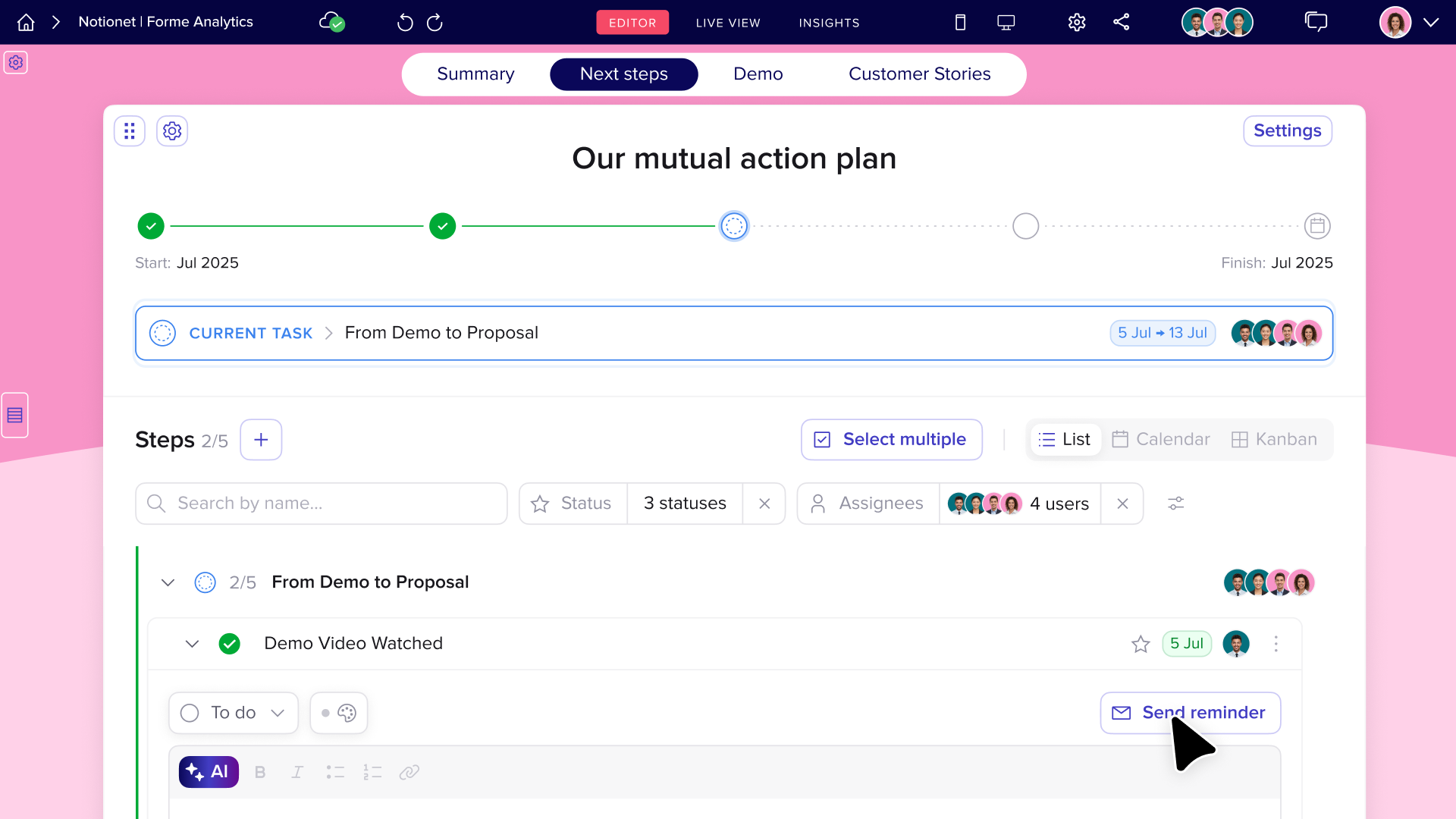
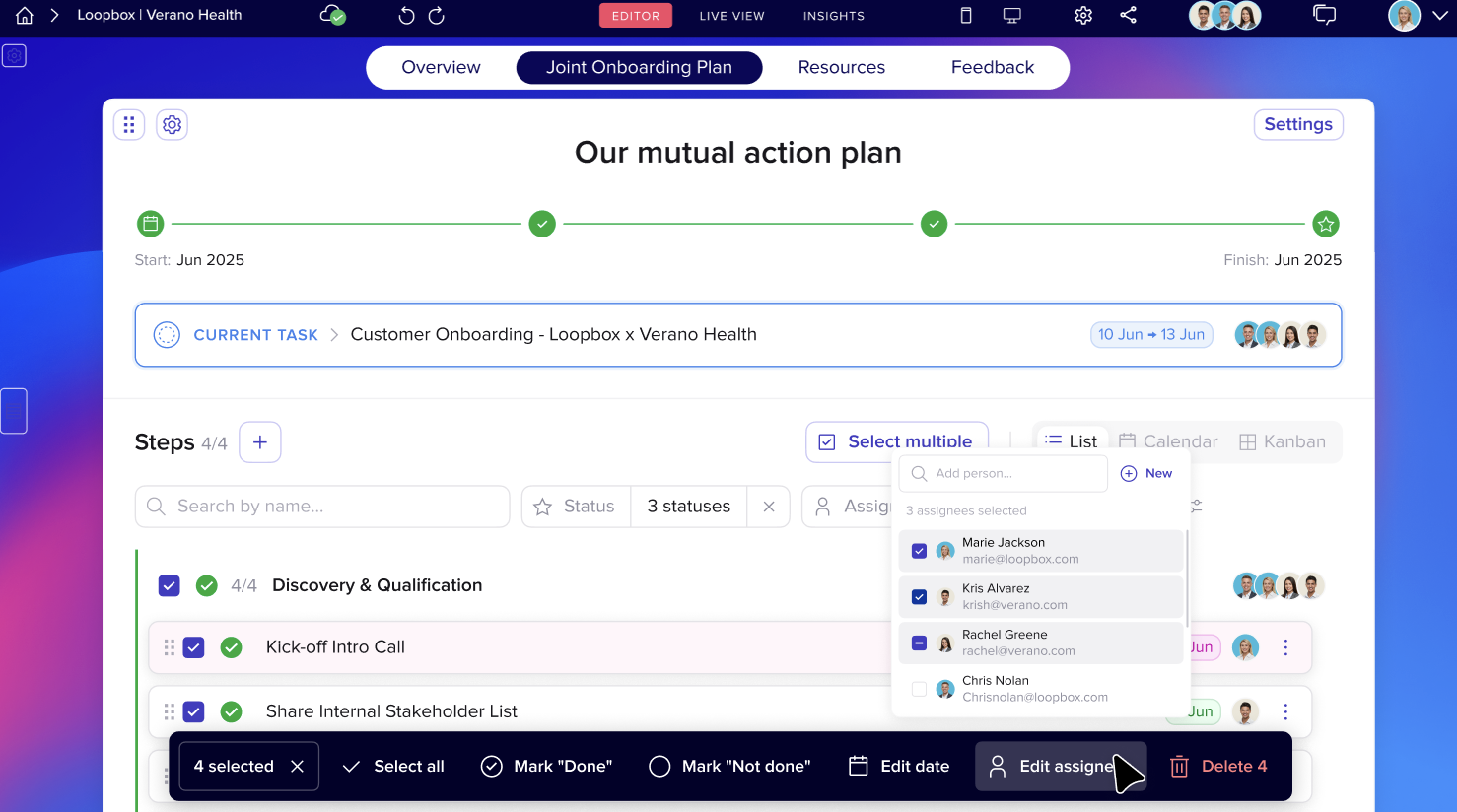
The new MAP introduces a horizontal progress tracker that makes it easier to see exactly where each deal stands.
Each stage is grouped clearly with start and end dates auto-filled.
You get a full picture at a glance. Easier to read, easier to follow, and easier to use. Clearer grouping and stage-level tracking keeps complex deals easy to follow.
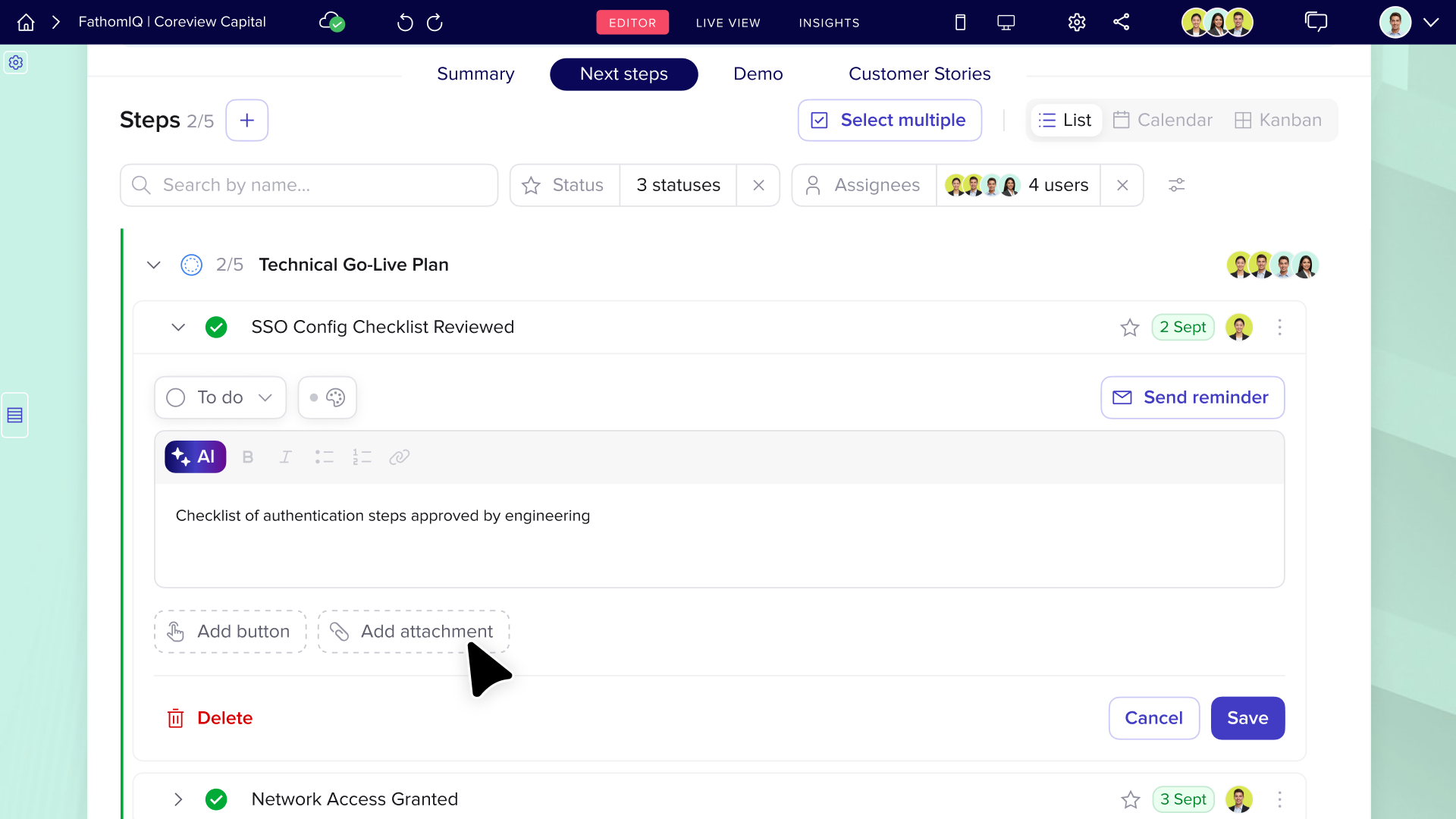
Smarter step editor
The step editor upgrades → Drive accountability and context
- Add agendas, notes, or supporting detail directly inside steps to remove ambiguity.
- Reminders keep assignees on track without manual chasing.
- So no more hunting around for context.
- Add notes, agendas or call summaries directly into each step
- Set reminders for buyers or teammates to stay on track, which keeps assignees on track without manual chasing.
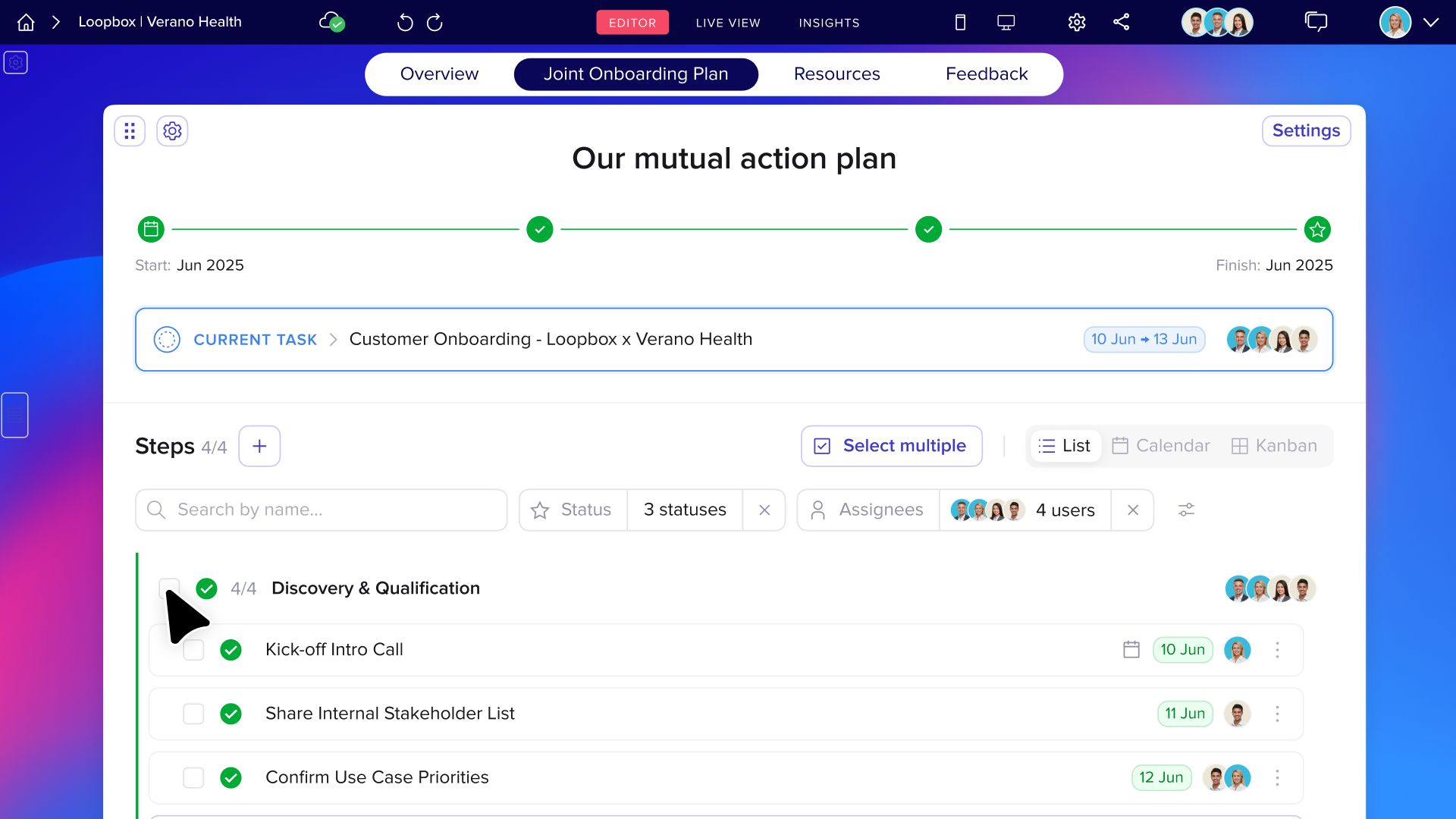
Bulk actions to save time
Bulk actions → Save time and reduce admin
- Manage multiple steps in one go.
- Multi-select tasks to assign, update or complete together.
- Drag-and-drop reordering makes restructuring fast and intuitive.
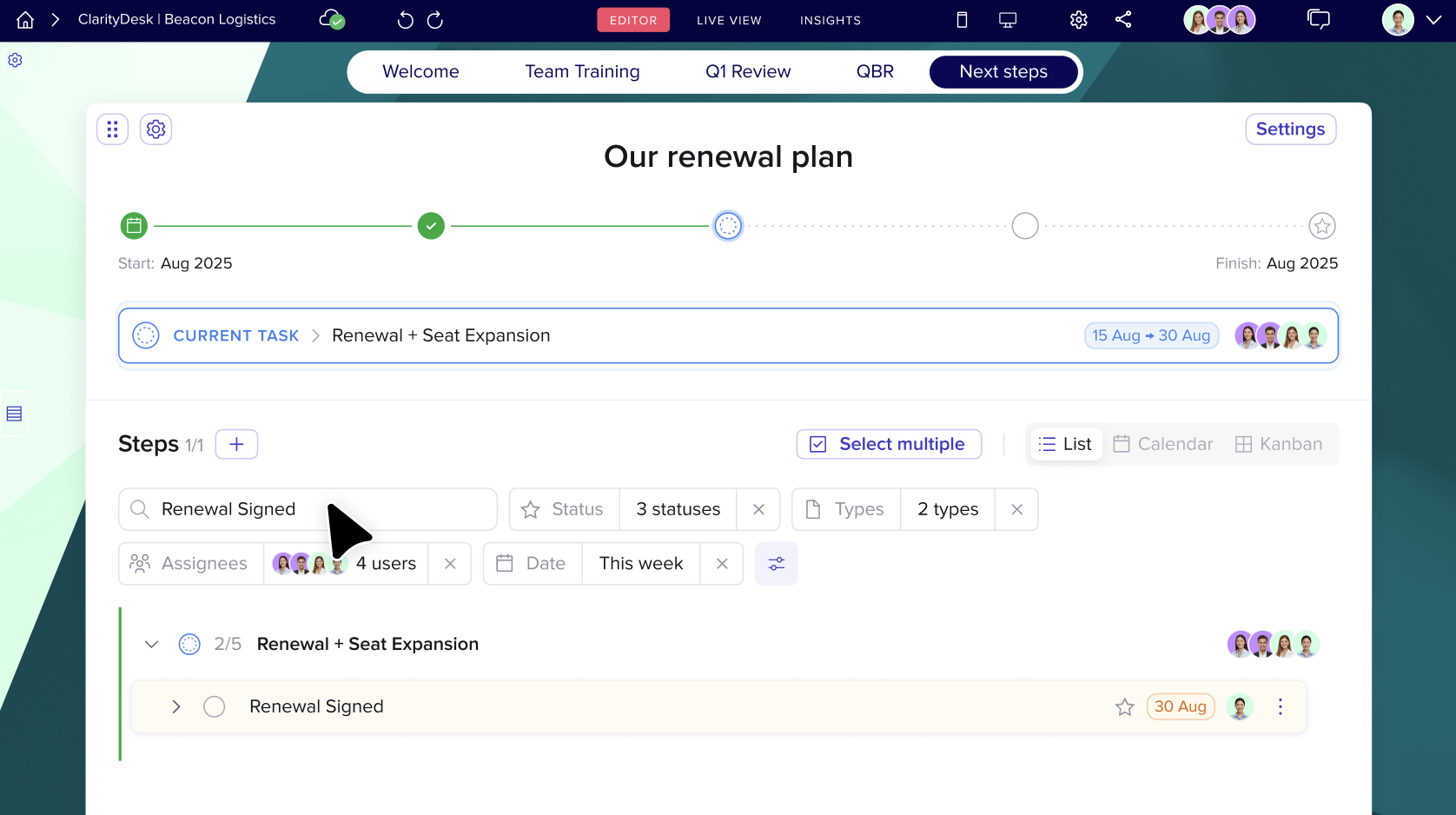
New search and filters
Search and filtering → Focus on what matters
- No more scrolling through long plans.
- Quickly find specific tasks with keyword search.
- Filter by status, type, assignee, or date to spotlight priorities and prevent blockers.
- Focus only on the steps that matter most right now.
Instant visibility for everyone
Collaboration & visibility → Keep everyone aligned
- Stay in sync without switching tools.
- Hover over any step to see owner, status and due date.
- Buyers see the same plan as you.
- Internal champions know what’s next without being chased.
Why this matters
It’s easier to follow
The horizontal layout gives both sides a clear view of what’s done, what’s next, and who owns what.
It reduces ambiguity
Inline notes and agendas mean there’s no confusion over what a task actually involves.
It saves hours
Bulk updates and reordering help reps spend less time managing admin and more time closing.
It helps forecast better
With MAP engagement data tied directly to your Pod, you can spot risk, track progress, and improve deal accuracy.
Frequently Asked Questions
What is a Mutual Action Plan?
A Mutual Action Plan, also written as MAP, is a shared plan between buyers and sellers that outlines what needs to happen next in a deal. It includes tasks, owners, deadlines, and progress, all in one place.
Do I need to manually update my existing MAPs?
No. Your existing MAPs will automatically move to the new format. No rework required.
Can the buyer interact with the MAP too?
Yes. Buyers can view tasks, mark steps as complete, and stay up to date without needing to log in. A collaborative Mutual Action Plan works best, keyword being mutual.
When should I introduce a MAP?
Ideally, introduce it early, during discovery or after the first call. It sets expectations and gives your champion a clear path to follow internally.
Can I use MAPs post-sale?
Yes. MAPs are great for onboarding, renewals and expansions. You can build success plans or track implementation in the same shared view.
Is this just a task list?
No. The MAP is more than a checklist. It’s a dynamic, collaborative workspace tied to your deal and fully integrated with the rest of your Pod.








![How to Get Started with Buyer Enablement [With Examples]](https://cdn.prod.website-files.com/65cf4fecbed2754c2236665d/65cf4fecbed2754c22366bdb_65a5af83e742f76e34ce06f3_Customer%2520Onboarding%2520_%2520Everything%2520you%2520need%2520(2).png)
.png)


.png)


.png)


.png)

.png)

.png)
.png)





