








We caught up with Helena, Senior AE at trumpet, to see how she uses Mutual Action Plans to keep momentum strong in complex, multi-stakeholder deals.
When deals involve multiple decision-makers, shifting priorities, and long gaps between meetings, it doesn’t take much for progress to quietly stall.
That’s where Mutual Action Plans come in.
According to Helena, when used correctly, a Mutual Action Plan doesn’t just organise next steps. It increases accountability, improves forecasting accuracy, and keeps both sides focused on progress.
Why introduce a Mutual Action Plan early?
Helena explains that the most effective Mutual Action Plans are introduced early in the deal, not as an afterthought.
A good MAP creates a shared timeline that clearly shows:
- What needs to happen
- Who owns each step
- What “done” actually looks like
When both buyer and seller can see the path forward, there is less ambiguity and fewer follow-ups.
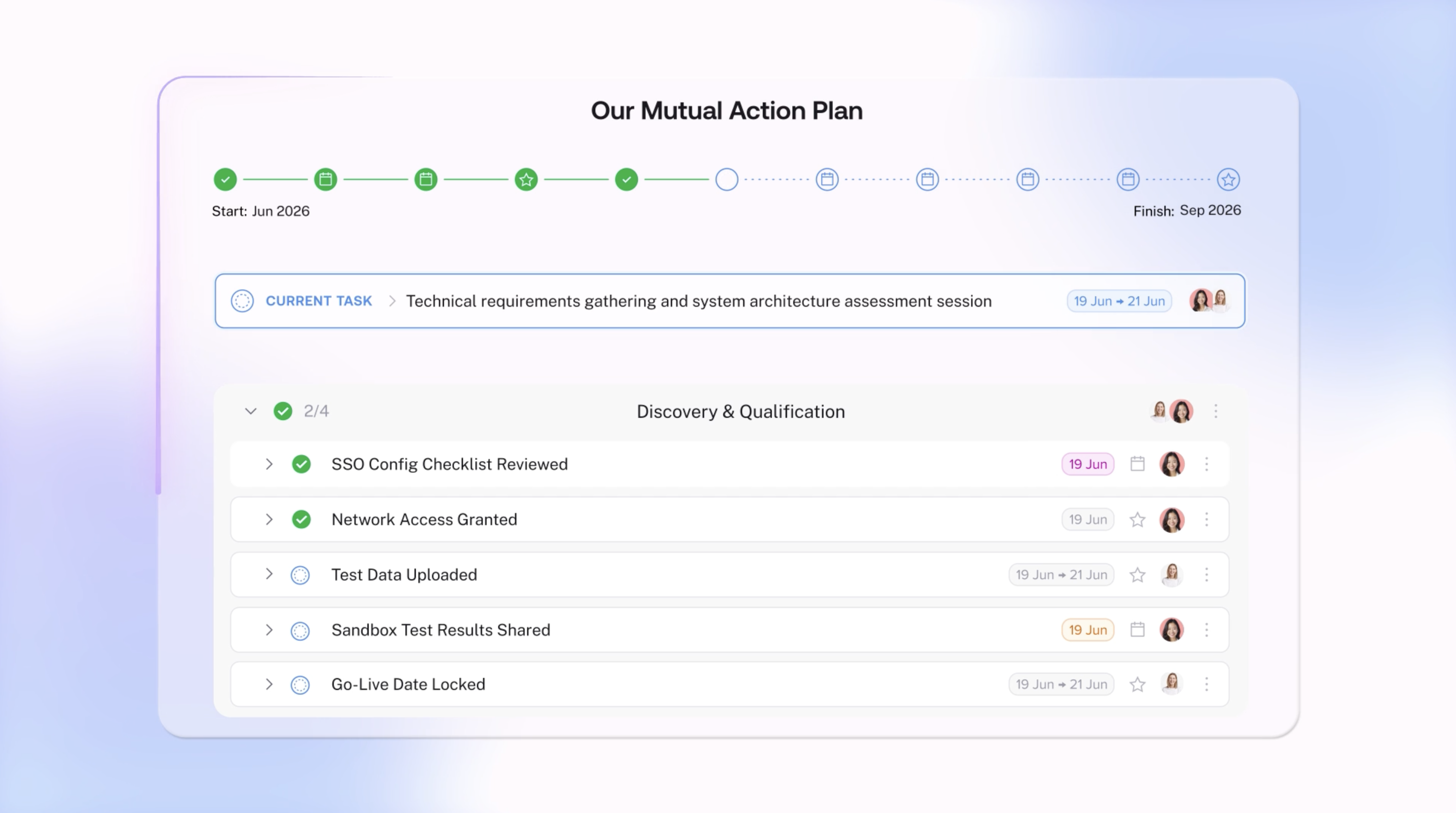
The feature Helena relies on most
One of Helena’s favourite parts of the updated Mutual Action Plan is the timeline view at the top of the plan.
It gives stakeholders an instant overview of what’s been completed and what’s still ahead. If a new stakeholder joins mid-deal, they can quickly understand the journey so far without needing a full recap call.
Hovering over steps reveals key context, upcoming milestones, and ownership, making progress visible at a glance.
Making progress visible between meetings
Within the plan, Helena can clearly see current tasks, assignees, and any overdue steps. She can adjust step types depending on whether it’s a meeting, milestone, or action.
Files, buttons, and context can all live directly inside the plan, reducing the need for long email threads.
What makes a Mutual Action Plan actually work?
Helena is clear on one thing: a Mutual Action Plan only works when it is truly mutual.
It is not something built for the buyer. It is something built with them.
Clients can edit the plan, add their own steps, and take ownership of what matters on their side. That shared ownership is what keeps deals moving.
Watch Helena walk through how she uses Mutual Action Plans in her deals below.
FAQs
What is a Mutual Action Plan in sales?
A Mutual Action Plan is a shared sales and buying timeline that outlines milestones, owners, and deadlines for both the seller and the buyer to move a deal forward collaboratively.
When should an AE introduce a Mutual Action Plan?
The best time to introduce a Mutual Action Plan is early in the deal, once qualification is confirmed and both sides agree there is a real opportunity to move forward.
How do Mutual Action Plans improve forecasting?
They improve forecasting by making buyer activity, overdue steps, and ownership visible, giving leaders evidence-based insight into deal progress rather than relying on rep confidence.
Can buyers edit a Mutual Action Plan?
Yes. A strong Mutual Action Plan is collaborative. Buyers can view, edit, and take ownership of their steps, which increases accountability and momentum.
P.S. Take a peek at our Mutual Action Plan update 👀
Mutual Action Plans in trumpet just got a major upgrade.
What’s new:
- A new snapshot progress tracker that maps the full plan journey at a glance, so everyone knows where things stand
- Switch to a new calendar view to see progress and responsibilities by date
- Automatic warnings and flags at the top of the MAP to show what's outstanding or due - at a glance
- Bulk editing and drag-and-drop functionality to update faster as plans evolve
- Add agendas, notes and auto-reminders to each step to keep momentum between meetings
- Advanced filters and searches to find your responsibilities super quickly
- A new Mutual Action Plan dashboard to see all your MAPs, spot overdue steps, and focus on what needs attention.
Fewer follow-ups, less context switching, and deals that keep moving even when meetings stop.









![How to Get Started with Buyer Enablement [With Examples]](https://cdn.prod.website-files.com/65cf4fecbed2754c2236665d/65cf4fecbed2754c22366bdb_65a5af83e742f76e34ce06f3_Customer%2520Onboarding%2520_%2520Everything%2520you%2520need%2520(2).png)
.png)


.png)


.png)


.png)

.png)

.png)
.png)





