








Key takeaways
- Mutual Action Plans keep deal context intact from sales to customer success
- Everything lives in one Pod, reducing handover friction and follow-ups
- CS teams can continue or expand plans for onboarding without starting over
- Shared visibility helps deals and customers keep moving, even between meetings
We caught up with Maddi Rose from the Customer Success team at trumpet, to see how he uses Mutual Action Plans to carry deals smoothly from sales into onboarding and beyond.
In this short walkthrough, Maddi shows how continuing and building on existing actions, owners, and timelines inside the Pod helps reduce follow-ups, keep context intact after close, and guide customers confidently through onboarding.
Watch the walkthrough below.
Customer Success teams often inherit deals with missing context. Important details live in CRM notes, inboxes, or conversations that never quite make it across.
Mutual Action Plans in trumpet are designed to change that.
They create a single, shared plan that follows the customer journey from deal close through onboarding and beyond, without breaking continuity.
What are Mutual Action Plans in trumpet?
Mutual Action Plans in trumpet are shared, collaborative plans that map out the steps required to move a deal or customer journey forward.
They live inside the Pod alongside content, conversations, and updates, giving Sales, Customer Success, and the customer a clear view of progress at every stage.
Instead of resetting after close, the plan continues.
How Mutual Action Plans support CS handover
When a deal moves from Sales to Customer Success, the Pod already contains the full picture.
Customer Success teams can immediately see:
- The original goals and success criteria
- Key stakeholders involved in the deal
- What has already been completed
- What still needs to happen next
There’s no need to re-discover information or ask customers to repeat themselves.
CS can take the existing Mutual Action Plan and either continue it as-is or add onboarding milestones, implementation steps, and success checkpoints.
Everything stays in one place.
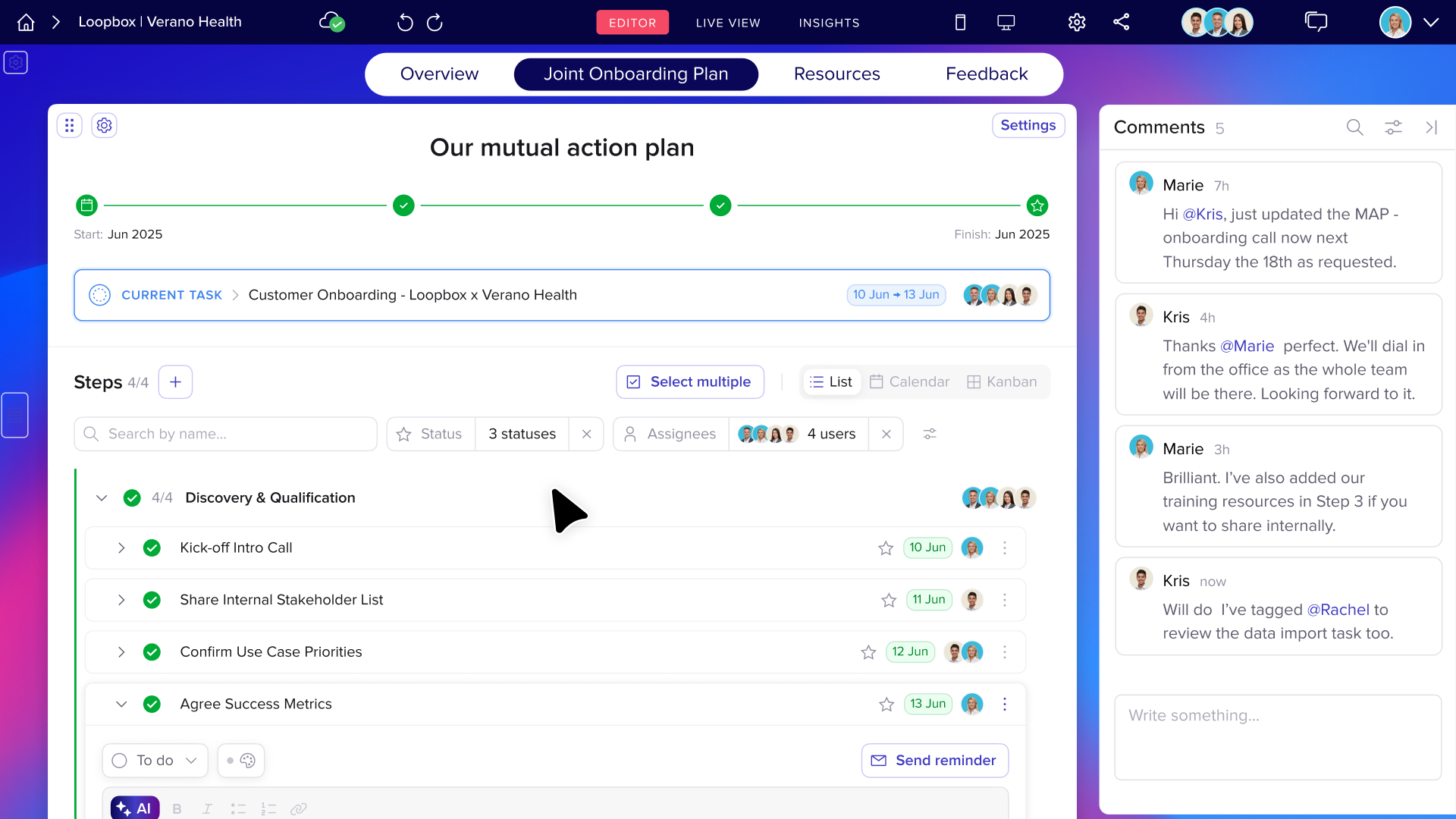
What’s new in Mutual Action Plans
The latest update makes Mutual Action Plans even easier to manage as deals and onboarding plans evolve.
New capabilities include:
- A horizontal tracker that shows the full journey at a glance
- Drag-and-drop and bulk editing to update plans faster
- Step-level agendas, notes, and reminders to maintain momentum
- Keyword search and filters to quickly find what matters
- Hover previews showing owners, status, and due dates instantly
These updates help teams stay focused on progress without extra clicks or admin.

Why this matters for modern revenue teams
Handover gaps slow down onboarding and damage the customer experience.
By keeping everything inside the Pod, Mutual Action Plans help teams:
- Reduce back-and-forth follow-ups
- Maintain continuity after close
- Create a clearer experience for customers
- Keep deals and onboarding moving between meetings
The result is better transparency, smoother transitions, and journeys that don’t stall when ownership changes.

Final thoughts
Mutual Action Plans in trumpet are built for how Sales and Customer Success teams actually work together.
They keep context intact, reduce friction at handover, and make it easier to guide customers from deal close to long-term success.
It’s a smarter, more collaborative way to move forward, without starting over.
FAQs
What is a Mutual Action Plan?
A Mutual Action Plan is a shared plan that outlines goals, steps, owners, and timelines to move a deal or customer journey forward.
Can Customer Success edit a Mutual Action Plan after close?
Yes. CS teams can continue or expand the existing plan to include onboarding and implementation steps.
Where do Mutual Action Plans live in trumpet?
They live inside the Pod alongside content, conversations, and updates.
Who can see the Mutual Action Plan?
Sales, Customer Success, and customers can all view progress in one shared place.









![How to Get Started with Buyer Enablement [With Examples]](https://cdn.prod.website-files.com/65cf4fecbed2754c2236665d/65cf4fecbed2754c22366bdb_65a5af83e742f76e34ce06f3_Customer%2520Onboarding%2520_%2520Everything%2520you%2520need%2520(2).png)
.png)


.png)


.png)


.png)

.png)

.png)
.png)





