



- A Digital Sales Room Template is a reusable Pod structure for a specific moment in the deal or customer journey
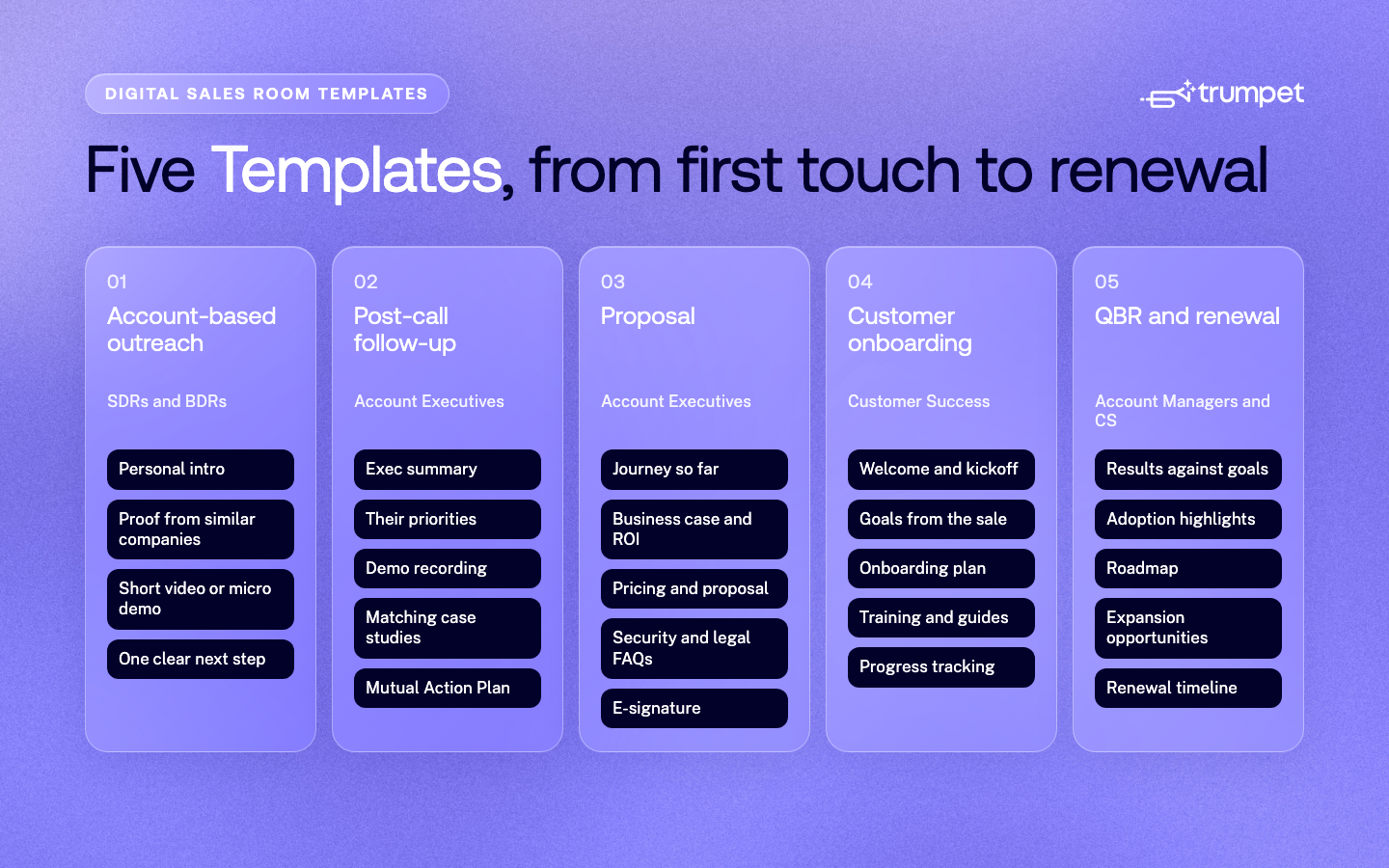
- Most revenue teams need five: account-based outreach, post-call follow-up, proposal, customer onboarding, and QBR and renewal
- In 2026, AI builds most Pods from the call recording, CRM and Content Library, while the Template keeps the structure consistent
- In trumpet, updating a Template updates every Pod built from it, and Template Analytics shows which Templates win the most deals
- You can build from a Template on any plan, or with trumpet Copilot and the MCP Server on the Elite plan
A Digital Sales Room Template is a reusable Pod structure your team uses for a specific moment in the deal or customer journey, so every buyer and customer gets a consistent, on-brand experience. Most revenue teams need five: account-based outreach, post-call follow-up, proposal, customer onboarding, and QBR and renewal. In 2026, teams rarely fill these in by hand. AI builds the Pod from the call, the CRM and your Content Library, and the Template keeps the structure consistent.
This guide covers what to include in each Template, what AI now does for you at each stage, and an example prompt you can adapt.
What is a Digital Sales Room Template?
A Digital Sales Room is a shared online space where sellers, customer success teams, buyers and customers work on a deal or account together. A Template is the structure behind it: the sections, Widgets and content that should appear every time.
Templates are not the same as slide decks. A deck is a one-off file. A Template is a living structure: in trumpet, when you update a Template, every Pod built from it updates too, and you can lock Templates so the structure stays on-message. Template Analytics then shows which Templates win the most deals and revenue, so you can double down on what works.
The 5 Digital Sales Room Templates every revenue team needs
1. Account-based outreach Template
Goal: give a target account a reason to take a first meeting, without another generic email.
What to include:
- A short, personal intro that references something specific about the account
- One or two pieces of proof from similar companies, such as a customer story
- A quick video or micro demo of the one problem you solve best for them
- A single, clear next step, such as booking a call
What AI changes: personalising outreach Pods used to take hours per account. Now AutoBrand applies each account's branding from its website, and teams can build Pods for a whole target list in one go. Read more about account-based selling with trumpet.
Example prompt: "Build me a Pod for each of these companies using our Outbound Template. Pull the recipient details from HubSpot."
2. Post-call follow-up Template

Goal: keep the deal moving between meetings, and give your champion something they can forward internally.
What to include:
- An exec summary of the call, written for stakeholders who weren't there
- The buyer's priorities, in their own words
- How you solve each priority, with the relevant demo recording or micro demo
- Two or three case studies that match their situation
- A Mutual Action Plan with the agreed next steps, owners and dates
What AI changes: this is where AI saves the most time. Instead of writing a recap from memory, sellers give trumpet Copilot the call recording, and Copilot builds the Pod around exactly what was discussed, including the exec summary and Mutual Action Plan. See post-call follow-ups.
Example prompt: "Build a follow-up Pod from this call. Include an exec summary, their top three priorities, a Mutual Action Plan to signature and two relevant case studies."
3. Proposal Template
Goal: give every decision-maker what they need to say yes, including people who weren't in earlier meetings.
What to include:
- A short summary of the journey so far, for new stakeholders
- The business case, ideally with an interactive ROI calculator
- Pricing and a proposal or quote
- The Mutual Action Plan to signature
- Security, legal and procurement FAQs
- E-signature, so the contract is signed in the same place
What AI changes: with Canvas, you describe the Widget you want and Canvas builds it on-brand, from ROI calculators to interactive competitor comparisons and pricing tier cards. For more on running these deals, see high ticket sales explained.
Example prompt: "Create an interactive ROI calculator using the numbers they shared on our last call."
4. Customer onboarding Template
Goal: get new customers to first value quickly, without losing anything that was promised during the sale.
What to include:
- A welcome and kickoff section from the customer success team
- The goals the customer agreed during the sale
- An onboarding plan with phases, milestones and owners on both sides
- Training videos, guides and FAQs
- Progress tracking, so everyone can see what's done and what's next
What AI changes: the Mutual Action Plan from the sale carries straight into onboarding, so customer success starts with full context. Canvas can turn that plan into a visual 90-day onboarding timeline. See customer onboarding with trumpet.
Example prompt: "Turn the Mutual Action Plan from the sales Pod into a 90-day onboarding plan with phases, milestones and owners."
5. QBR and renewal Template
Goal: show the value delivered, spot risk early and set up the renewal and expansion.
What to include:
- Results against the goals agreed at the start
- Adoption and usage highlights
- What's coming next on the roadmap
- Expansion opportunities across other teams
- A renewal timeline with owners on both sides
- An up-to-date Org Chart of the people involved
What AI changes: Insights and Signals show which stakeholders are engaged and which have gone quiet, so you can flag risk before the renewal date. Accounts View groups every Pod for the same customer in one place. See account management with trumpet.
Example prompt: "Which of my renewals look at risk?"
How do you build a Digital Sales Room from a Template?

There are three ways to build a Pod in trumpet, depending on how your team works:
- From a Template. Start from one of your team's Templates, then personalise it. AutoBrand applies the buyer's branding, and CRM variables fill in their details. Templates are available on every trumpet plan.
- With trumpet Copilot. Give Copilot a prompt, a call recording or a document, and it builds the Pod from your Templates and Content Library.
- From your own AI tools. With the trumpet MCP Server, you can create and update Pods from Claude, ChatGPT or Gemini.
Copilot and the MCP Server are available on trumpet's Elite plan.
How do you know which Templates work?
Track each Template's results, not just its usage. Template Analytics shows win rate and revenue by Template, so you can see which structure closes the most deals and roll it out across the team. Insights and Signals then show how buyers and customers engage with each section, so you know what to keep and what to cut.
Final thoughts
A good Template captures what your best people do at each stage of the deal and customer journey, and makes it the default for everyone. Build one for each of the five moments above, let AI do the first draft, and use the results to keep improving them.
FAQs
What is a Digital Sales Room Template?
A reusable Pod structure for a specific stage of the deal or customer journey, such as a post-call follow-up or onboarding. It defines the sections and content every buyer or customer should see.
Is a Digital Sales Room Template the same as a slide deck?
No. A deck is a static file. A Digital Sales Room Template is a live, shared space with interactive content, a Mutual Action Plan and engagement data, and it can be updated after it's sent.
Can AI build a Digital Sales Room?
Yes. Trumpet Copilot can build a complete Pod from a prompt, a call recording or a document, using your Templates and Content Library.
How many Digital Sales Room Templates do we need?
Most teams start with five: account-based outreach, post-call follow-up, proposal, customer onboarding, and QBR and renewal. Add more for specific products, segments or regions once these are working.
How do we keep Templates up to date?
Update the Template, and every Pod built from it updates too. Lock Templates where the structure must stay consistent, and review Template Analytics each quarter to see which ones to improve.
.png)

See what your buyers are doing between meetings
Build a Pod, share it with the buying committee and watch the signals roll in. Free to start.

.png)













![How to Get Started with Buyer Enablement [With Examples]](https://cdn.prod.website-files.com/65cf4fecbed2754c2236665d/65cf4fecbed2754c22366bdb_65a5af83e742f76e34ce06f3_Customer%2520Onboarding%2520_%2520Everything%2520you%2520need%2520(2).png)
.png)


.png)


.png)


.png)

.png)
.png)

