



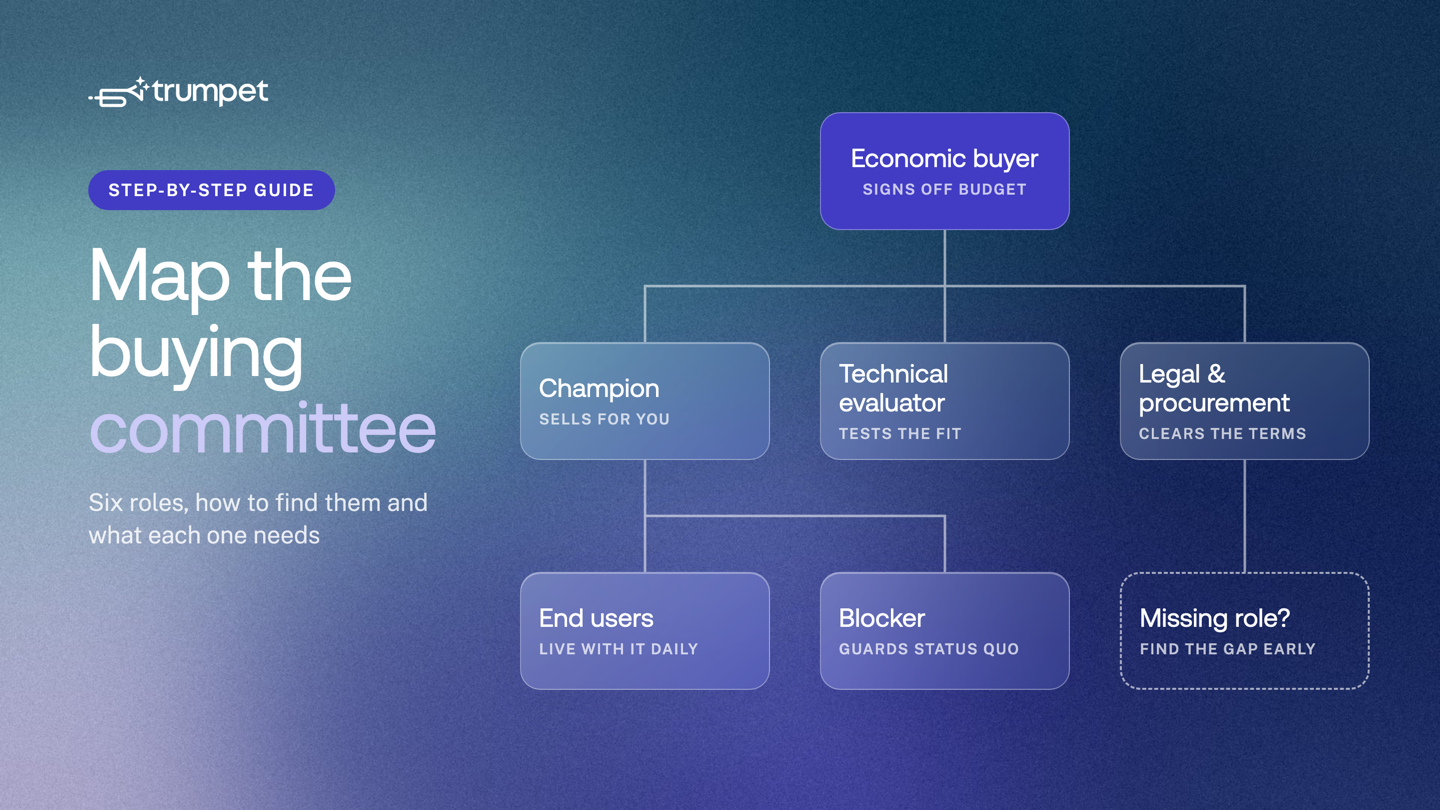
- Map a buying committee in five steps: list contacts, assign roles, find gaps, give each role what it needs, keep it current.
- Cover six roles: economic buyer, champion, technical evaluator, legal and procurement, end users and blockers.
- Each role has different concerns, so each needs different content from you.
- Empty roles, often the economic buyer or legal, are where deals stall late.
- Trumpet's Org Chart adds Pod viewers automatically and syncs with HubSpot, Salesforce and Gong.
- AI Org Charts, including Scout AI and Casey, are available on the Elite plan.
Updated 24 September 2026
To map a B2B buying committee, list everyone involved in the deal, give each person one of six roles (economic buyer, champion, technical evaluator, legal and procurement, end users, blocker), then find the roles you haven't reached yet. Each role has different questions, so each needs different content from you. Keep the map current, because buying committees change during a deal and again after it closes.
What a buying committee map is
A buying committee map is a simple chart of who takes part in a purchase decision, what role each person plays and how engaged they are. It shows Revenue Teams who to talk to, what to send them and where the gaps are.
Without a map, most deals rest on one contact. If that person goes quiet, changes job or loses the internal argument, the deal stalls and you don't know why. A map makes the risk visible early, while you can still do something about it.
This guide covers how to build the map. Two related topics have their own posts: how to bring the group to a shared decision is in our guide to stakeholder management in multi-stakeholder sales, and how to build relationships across the map is in our guide to multi-threading in enterprise sales.

Step 1: List everyone you already know
Start with what you have. Pull every contact linked to the account and opportunity in your CRM. Add everyone who has joined a call, been copied on an email or opened what you've shared.
Write each name down with their job title and team. Don't assign roles yet. The aim is a complete list, not a judgement.
Step 2: Give each person a role
Most B2B deals involve the six roles below. One person can hold two roles, for example a head of operations who is both your champion and the main end user. Some roles may be filled by a small group rather than one person.
Economic buyer
How to identify them: they own the budget and give the final yes. Ask your champion, "Who signs off spend at this level?" The answer is often more senior than your main contact expects.
What they need: a short business case. The problem in their terms, the cost of doing nothing, the expected return and the risk. They rarely read detail, so give them one page.
Champion
How to identify them: they want the change to happen and will spend their own time making the case. They share your material internally, introduce you to others and tell you what is really going on.
What they need: material they can forward without rewriting, answers to the objections they'll hear and a clear view of the next steps. Our post on how to equip your champion to sell internally covers this in depth.
Technical evaluator
How to identify them: IT, security, data or engineering leads who are asked whether the product fits the current stack. They often appear after the first demo, when someone asks, "Does it work with our systems?"
What they need: security documentation, integration details, architecture answers and a contact who can answer technical questions quickly. Point them to your trust centre rather than sending files one by one.
Legal and procurement
How to identify them: they review contracts, data processing terms and supplier onboarding. Ask early, "What does your procurement process look like, and how long does it usually take?"
What they need: standard terms, a data processing agreement, pricing in writing and a clear timeline. Late surprises here can push a deal past quarter end.
End users
How to identify them: the people who will use the product every day. They are often in the team your champion manages, or in teams next to it.
What they need: proof it will make their work easier, not harder. Short product videos, a view of the day-to-day workflow and a sense of how onboarding will run.
Blockers
How to identify them: people who gain from the current setup or lose from the change. That could be the owner of a tool you'd replace, a team with a competing priority or a senior leader who wasn't consulted. They often show up as slow replies, new requirements late in the deal or "let's revisit next quarter".
What they need: to be heard. Find out the real concern, answer it directly and show how the change affects their team. Ignoring a blocker rarely makes them go away.
What each role cares about, and what to give them
| Role | What they care about | What to give them |
|---|---|---|
| Economic buyer | Return, cost of doing nothing, risk | One-page business case and pricing summary |
| Champion | Looking good internally, getting the change through | Forwardable material, objection answers, a shared plan |
| Technical evaluator | Security, integrations, effort to run | Security documents, integration details, a technical contact |
| Legal and procurement | Terms, data protection, supplier process | Standard terms, DPA, written pricing, a timeline |
| End users | Ease of use, time saved, onboarding | Short product videos, workflow examples, an onboarding plan |
| Blocker | What they stand to lose | A direct conversation and a clear answer to their concern |
Step 3: Find the gaps
Look at your map and ask which roles are empty. Gaps often sit with the economic buyer, legal and procurement, and the technical evaluator. These roles tend to arrive late and slow things down.
For each empty role, ask your champion who fills it and how to reach them. Then mark how engaged each known person is: active, quiet or not yet contacted. A map with six names and four of them silent is a warning, not a win.
Step 4: Give each role what it needs
Use the table above to plan what each person sees. Put it all in one shared space rather than separate email threads, so your champion can forward one link and every new reader finds the right material. A Digital Sales Room works well for this, with a section for each role.
Agree the steps each role owns, such as the security review or contract sign-off, in a Mutual Action Plan with owners and due dates. That way the plan shows who still needs to act.
Step 5: Keep the map current
Buying committees change. New people join for the security review, a sponsor moves teams or a quiet stakeholder suddenly starts reading the proposal. Review the map at least weekly in an active deal.
The map matters after signature too. Customer Success teams use it to know who owns the relationship, who needs onboarding and who to bring in for renewal and expansion. When a champion leaves, an up-to-date map shows who else knows the product.
How trumpet's Org Chart helps
Trumpet's Org Chart sits inside each Pod and shows every stakeholder in the deal in one place. It does much of the work above for you.
- People are added as they engage. Anyone who views your Pod is pulled into the Org Chart as a contact, so new stakeholders show up when your champion shares the link. You can also add people by hand.
- Roles fit how your buyers buy. You can create custom buyer roles and set influence based on what you know about the account.
- Context stays with the deal. Notes, objections and call insights can be added to any stakeholder card and are visible to your whole team.
- It connects to your CRM. New stakeholders are enriched and synced with HubSpot, Salesforce and Gong, and you can view a live Org Chart inside those tools. See the HubSpot and Salesforce integration pages for what syncs each way.
On the Elite plan, AI Org Charts add four AI features:
- AI Auto-Organise maps your Pod viewers into a buying committee in one click, placing decision makers, champions, blockers and influencers.
- Scout AI looks at who is already in your chart and recommends missing stakeholders from LinkedIn, each with a reason why they matter.
- AI Engagement Scores give each stakeholder card a live score based on views, time spent and actions in the Pod.
- Casey, your Engagement Coach, gives a deal health breakdown on request: who is most active, where senior engagement is coming from and whether your champion is holding.
AI Org Charts are only available on Elite. See pricing for what each plan includes.
Frequently asked questions
What is a B2B buying committee?
A buying committee is the group of people who influence or approve a B2B purchase. It usually includes an economic buyer, a champion, technical evaluators, legal and procurement, end users and sometimes a blocker.
How do you identify the economic buyer?
Ask your champion who signs off spend at the deal's value. The economic buyer owns the budget and gives the final yes, and is often more senior than your day-to-day contact.
What is the difference between a champion and an economic buyer?
A champion wants the change and argues for it internally, while the economic buyer controls the budget and approves it. Sometimes one person is both, but in larger deals they are usually different people.
How often should you update a buying committee map?
Review it at least weekly in an active deal, and again at key moments such as a security review, contract stage, onboarding and renewal.
Does trumpet's Org Chart use AI on every plan?
No, AI Org Charts are available on the Elite plan only. They include AI Auto-Organise, Scout AI, AI Engagement Scores and Casey, Engagement Coach.
Can Customer Success teams use a buying committee map?
Yes, Customer Success teams use the same map to manage onboarding, spot when a champion leaves and find the right people for renewal and expansion.
.png)

See what your buyers are doing between meetings
Build a Pod, share it with the buying committee and watch the signals roll in. Free to start.

![How to Get Started with Buyer Enablement [With Examples]](https://cdn.prod.website-files.com/65cf4fecbed2754c2236665d/65cf4fecbed2754c22366bdb_65a5af83e742f76e34ce06f3_Customer%2520Onboarding%2520_%2520Everything%2520you%2520need%2520(2).png)

.png)
.png)
.png)

.png)
.png)






.png)

.png)














