


Updated 8 October 2026
You get buyers to participate in a Mutual Action Plan by building it with them, giving them steps they own, and putting it where they already work. Draft the plan live on a call, keep it short, give every buyer step a named owner and a due date, and host it inside the Pod rather than in a spreadsheet. Then let automated reminders do the chasing, and treat a stalled step as a signal to diagnose, not a date to push back.
Most Revenue Teams already know what a Mutual Action Plan (MAP) is. The hard part is getting buyers to use one. A plan that only the seller updates is just a sales process on paper. This guide covers how to get buyers and customers to take part, not just view it. If you need a starting structure, use our ready-to-use Mutual Action Plan Templates.
Why buyers ignore most Mutual Action Plans
Buyers skip MAPs for a few predictable reasons:
- It's the seller's plan, not theirs. The steps describe your sales stages, not their internal buying process.
- Nobody on their side owns anything. If buyer steps say "client", no one feels responsible.
- It's too long. Thirty steps reads as homework.
- It lives in the wrong place. A spreadsheet in an email thread gets buried in a day.
As trumpet Senior Account Executive Helena Clisby puts it, "The clue is in the word mutual." If you're only listing your steps, buyers have no reason to open it.
How do you get buyers to participate in a Mutual Action Plan?
Make the plan theirs: co-create it, give them owned steps, keep it short and put it in the Pod they already use. Six habits make the difference.

1. Co-create the plan on a call
Don't send a finished plan. Open it on screen near the end of a discovery call or demo and build it together. Ask the buyer what has to happen on their side before they can sign: security review, budget approval, a legal check, a meeting with the CFO. Type their answers in as steps, in their words, with the dates they suggest.
People commit to plans they helped write. It also surfaces blockers early, while you still have time to plan around them. Our guide to structuring a winning demo covers how to agree next steps before the call ends.
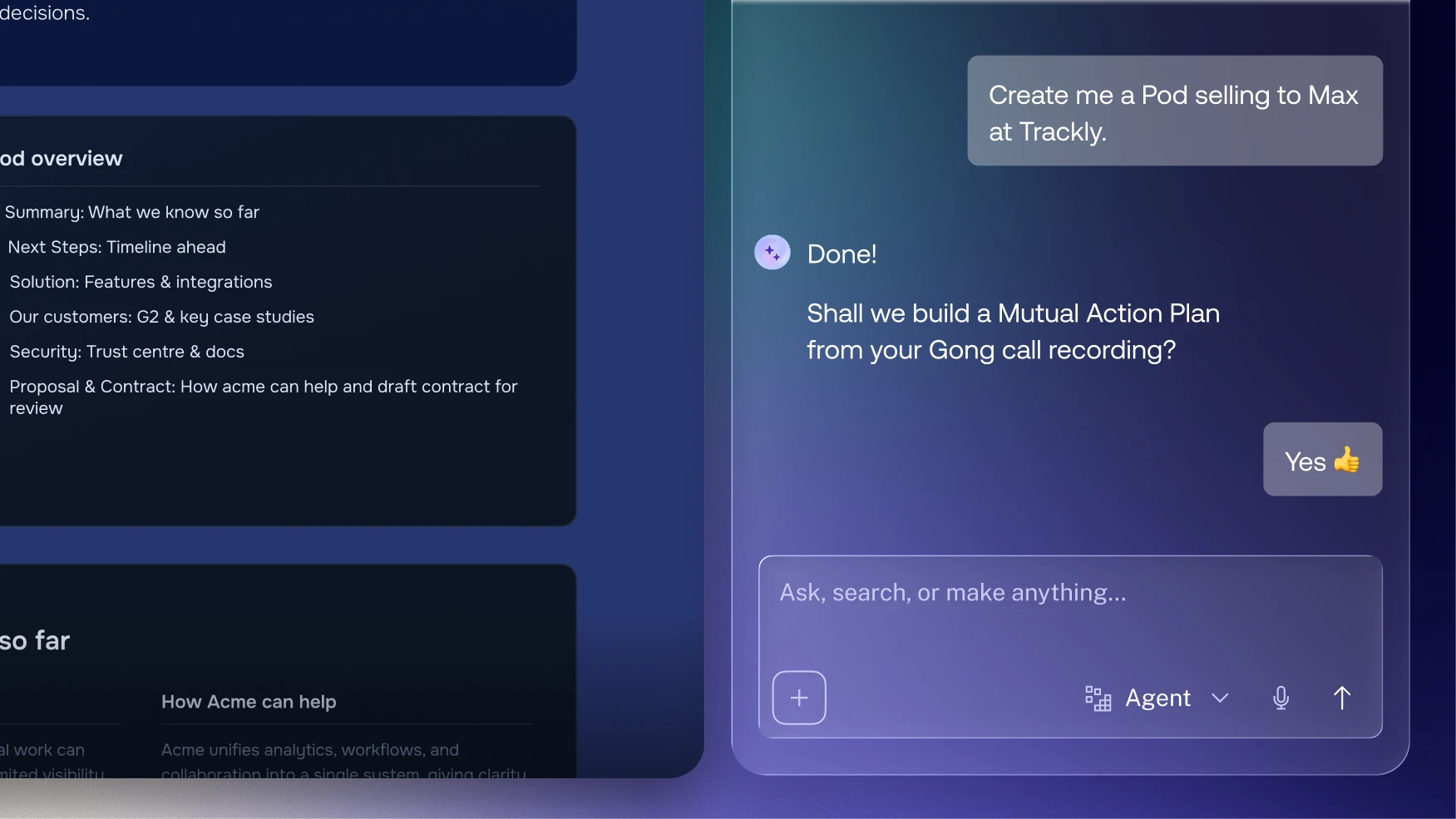
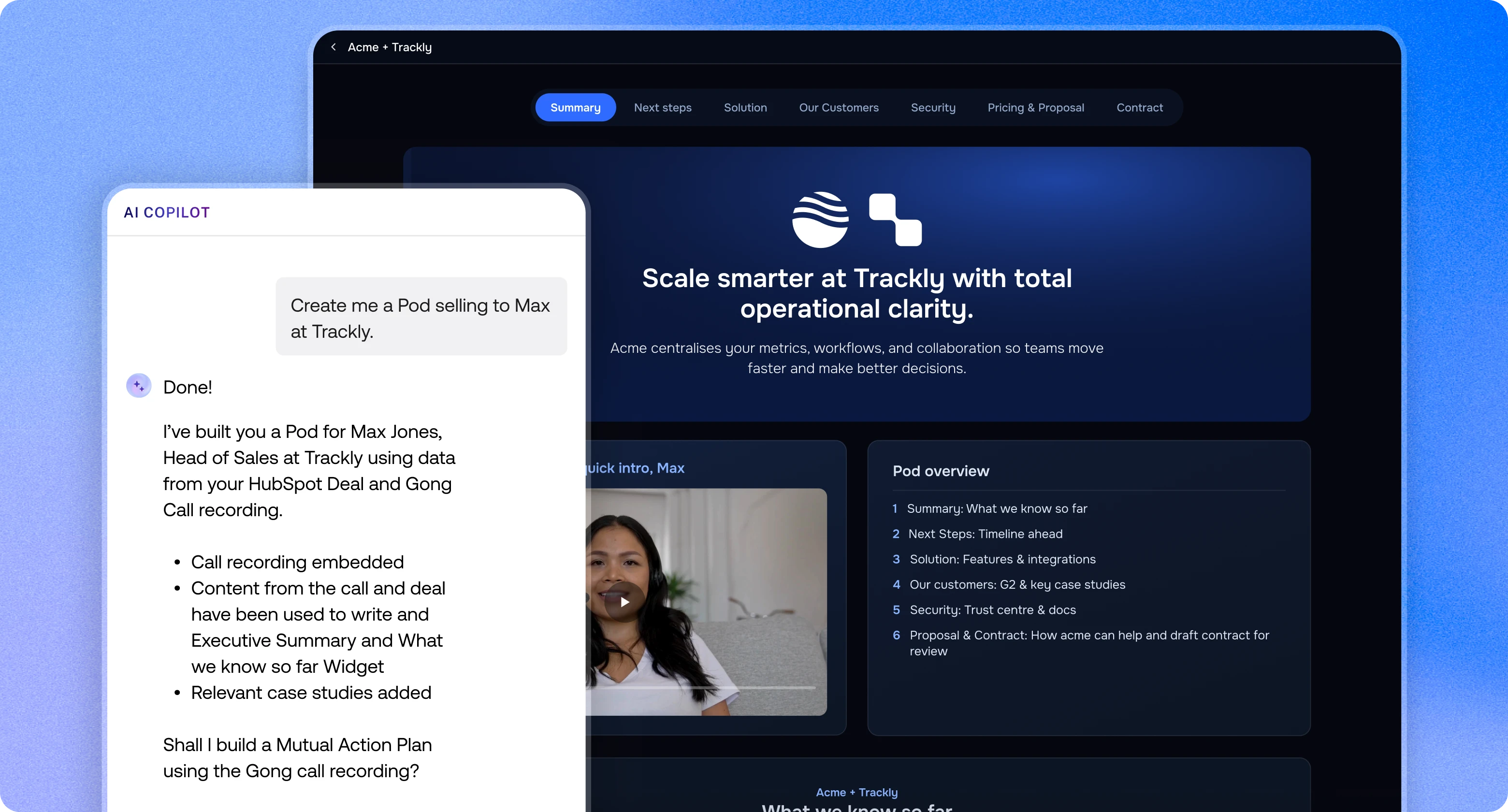
If you record calls in Gong, Copilot in trumpet can build the first draft of the MAP from the recording, with steps, owners and dates filled in. You then review it with the buyer rather than starting from a blank page.
2. Give buyers steps they own
Every buyer step needs a named person and a due date. "Client to review" is not a step. "Priya to share security questionnaire by 14 October" is.
- Assign steps to the actual stakeholder, not just your champion.
- Use step types to make priorities clear. trumpet supports Meetings, To-dos and Milestones.
- Add internal buyer milestones, such as "Meeting with CFO", even though you won't attend.
Owned steps also help your champion sell internally, because they can show colleagues exactly what's needed from whom. See how to equip your champion to sell internally.
3. Keep it short
A MAP buyers use fits on one screen. Include only the steps that move the decision forward and group them by stage, for example Evaluation, Business case, Security and legal, Sign-off. Keep your own internal admin out of it. If a step doesn't need the buyer to see it, it doesn't belong in the plan.
4. Put it where they already are, in the Pod
Buyers won't log into another tool to tick off a task. In trumpet, the Mutual Action Plan lives inside the Pod, the branded Digital Sales Room where buyers already read proposals, watch demos and share content. Buyers open one link with no login, and can tick off their steps, add comments and upload files there.
Because the plan sits next to everything else in the deal, every visit to the Pod is a reminder of what's next. Buyers can share the same link with other stakeholders, and updates sync in real time. If you sell through HubSpot, MAP progress shows on the deal and reps can tick steps off there too.
5. Let reminders and signals do the chasing
Nobody wants to be the rep who sends "just following up" every three days. On the Mutual Action Plan product page, trumpet lists automated reminders for buyers on their steps, so the plan nudges people instead of you.
It works the other way too. When a buyer checks off a step, trumpet can push a signal to Slack, Microsoft Teams or your CRM. You can respond while the buyer is engaged, rather than finding out at the next weekly call.
6. Review the plan on every call
Open the MAP at the start or end of each meeting. Tick off what's done together, agree what's next and adjust dates in front of the buyer. This keeps the plan live and shows buyers it's the real source of truth, not a document you made once.
Here's Helena's walkthrough of building a collaborative MAP in trumpet:
Do this, not that: getting buyers to take part
| Area | Do this | Not that |
|---|---|---|
| Building the plan | Draft it live on a call and let the buyer edit steps and dates as you go | Email a finished plan and ask them to "take a look" |
| Ownership | Name a buyer owner and a due date on every buyer step | Assign buyer steps to "client" or leave them blank |
| Length | Keep it to the steps that move the decision, grouped by stage | List every internal task your team will ever do |
| Location | Put it in the Pod, one link with no login, next to the content | Attach a spreadsheet or a PDF to an email thread |
| Follow-up | Use automated reminders on due dates and act on completion alerts | Chase by hand with "just following up" emails |
| Stalled steps | Find out what's blocking, then split, reassign or support the step | Push the date back a week and hope |
What to do when Mutual Action Plan steps stall
When a step stalls, find out why before you chase. An overdue step is information. It usually means the owner is wrong, the step is too big, or the buyer's priorities have shifted.
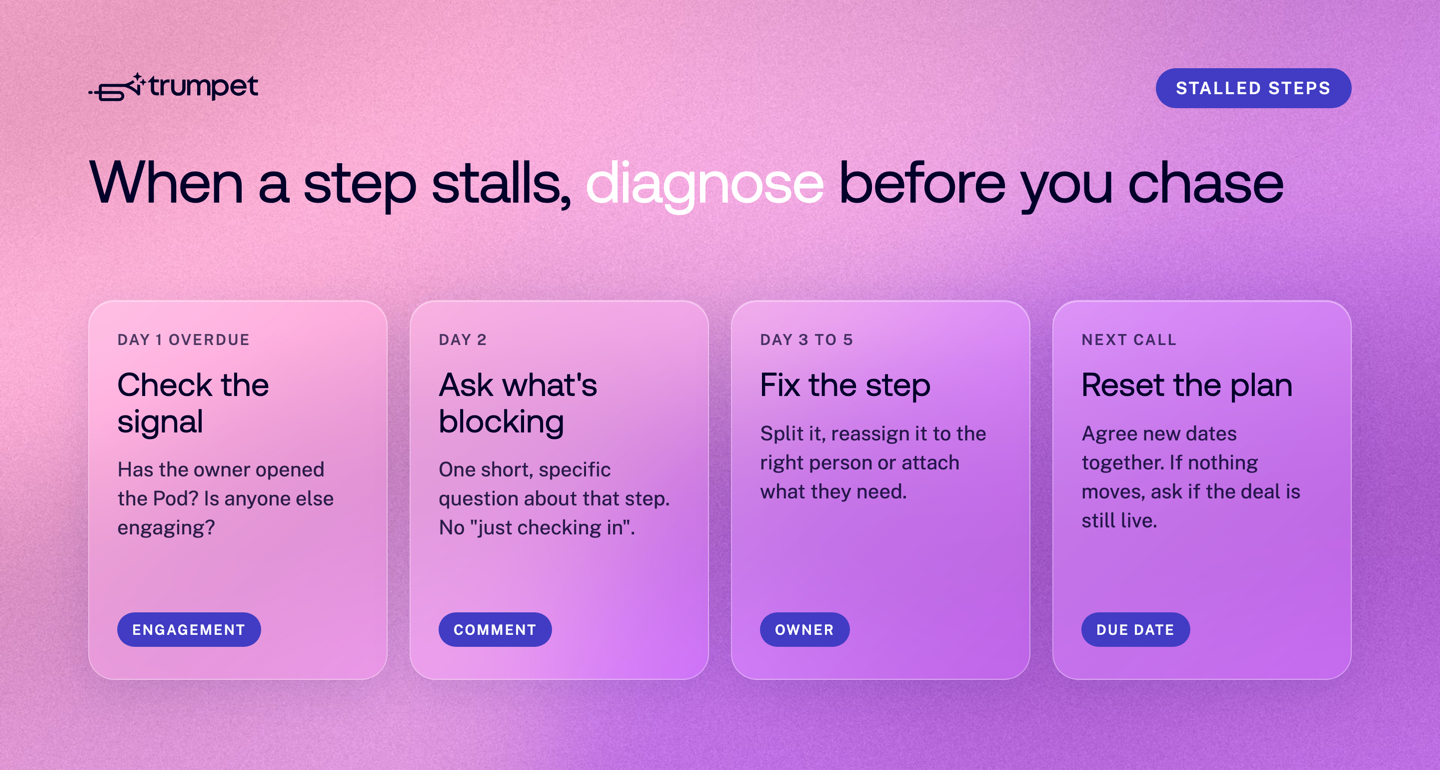
- Check the signal. Has the step owner opened the Pod recently? Is anyone else on the buying team engaging? Every viewer gets an Engagement Score, so you can see who has gone quiet.
- Ask what's blocking. Send one short, specific question about that step. "Is the security questionnaire with your IT team yet?" gets a reply. "Any update?" doesn't.
- Fix the step. Split a big step into smaller ones, reassign it to the person who can actually do it, or attach the document they need.
- Reset the plan together. On the next call, agree new dates with the buyer. If several steps stall and nobody responds, ask directly whether the project is still a priority.
For managers, the MAP Dashboard shows every Mutual Action Plan across every Pod, so overdue or at-risk plans stand out without opening each deal. Steps carry statuses (Not started, In progress, Completed, Overdue), which makes stalls easy to spot. Leaders can read how to track Mutual Action Plan progress with buyer engagement signals. For more on spotting a deal going cold, read how to prevent buyer disengagement with a Digital Sales Room.
Why Mutual Action Plans fail (and how to fix them)
Most Mutual Action Plans fail because they are built around the seller's process, not the buyer's. The steps mirror your pipeline stages, nobody on the buyer side owns anything, and the plan sits in a file nobody opens. The fix is to rebuild it around what the buyer has to do to reach a decision, with named owners on both sides.
Warning signs your Mutual Action Plan is failing
Check a live deal against this list. If two or more apply, rebuild the plan with your buyer on the next call.

- Dates keep slipping, call after call.
- Only you update it. The buyer views it but never ticks a step.
- One contact is engaged. Decision makers never open it.
- Steps have no named owner, just "client".
- It follows your sales stages, not their security, budget or legal steps.
- It lives in a spreadsheet, with updates scattered across email and Slack.
The common mistakes and how to fix them
| Mistake | What it looks like | How to fix it |
|---|---|---|
| Built around your sales stages | Demo, proposal, negotiation, close | Plan around what happens between meetings: what the buyer must do before the next one, and what they need from you |
| Introduced at the wrong time | It first appears at contract stage, so it feels like admin | Introduce it once the buyer commits to an evaluation, usually at the end of discovery or the demo |
| No clear reason to follow it | Steps are framed around signing | Tie steps to the buyer's goal, such as "Train the support team so they can go live by [date]" |
| Single-threaded | Only your champion appears in the plan | Add steps for legal, security, finance and the economic buyer, and share the Pod link with them |
| Vague ownership | "Legal to review contract" | "Sarah (buyer legal) and Tom (Account Executive) to finalise the contract by [date]" |
| A static file | A spreadsheet or PDF attached to an email | Host it in the Pod, with live updates, reminders and engagement signals |
If you only fix one thing, fix the first. In a trumpet webinar, Ollie Sharpe pointed out that many teams define the plan by their own sales stages rather than what the buyer needs. His fix is to plan around the next meeting: "What do you need to do before that meeting? What do you need from me?" That turns a seller's checklist into a shared plan.
Does your Mutual Action Plan need a makeover?
If it lives in a spreadsheet, probably. Spreadsheets are quick to set up and familiar, which is why so many plans start there. But they can't remind buyers about due dates, show who has opened the plan or tell you when a step is done. Moving the plan into the Pod keeps the steps, owners, dates and documents in one link, with real-time updates for both sides. Sales and customer success then share one plan from first call to onboarding.
Why buyer participation matters
A MAP that buyers update gives both sides the same view of the deal. Sellers see real progress instead of guessing, and buyers see exactly what's needed to get to a decision. It also gives you an early warning when a deal is slipping, long before the forecast call.
The value carries on after the deal closes. In trumpet, the same plan becomes the onboarding plan, so customer success teams pick up the steps the buyer already knows. See how to create a Mutual Action Plan, with best practices for the wider process, and what to look for in Mutual Action Plan software.
You can try Mutual Action Plans on trumpet's Free plan, with 10 Pods and unlimited users. See pricing for details, or browse more guides in our Mutual Action Plan hub.
Frequently asked questions
How do you get buyers to participate in a Mutual Action Plan?
Build the plan with them on a call, give them named steps with due dates, keep it short and host it in a shared Pod they can open without a login. Then use reminders and review the plan on every call so it stays live.
Why is my Mutual Action Plan not working?
Usually because it reflects your sales process rather than the buyer's. Rebuild it with the buyer around what they must do before each meeting, name an owner and a date on every step, and host it in a shared Pod instead of a spreadsheet.
What is the biggest Mutual Action Plan mistake most teams still make?
Building the plan around their own sales stages instead of the buyer's journey. The plan becomes a to-do list for the seller, so buyers have no reason to use it.
When should you introduce a Mutual Action Plan?
Introduce it as soon as the buyer commits to an evaluation, usually at the end of discovery or the demo. Leave it until the contract stage and it feels like admin.
Is a spreadsheet good enough for a Mutual Action Plan?
It works for a simple internal checklist, but not for a plan buyers need to use. A spreadsheet can't send reminders, show engagement or give buyers one link to everything, so it is easily lost in an inbox.
Should the buyer or the seller own a Mutual Action Plan?
Both should own it, with each step assigned to a named person on one side or the other. The seller usually sets it up and keeps it tidy, but the buyer's steps should reflect their internal process.
How many steps should a Mutual Action Plan have?
As few as it takes to reach a decision, usually a short list grouped into a handful of stages. If buyers have to scroll to find their next step, the plan is too long.
Do buyers need a login to update a trumpet Mutual Action Plan?
No, buyers open the Pod from a link and can tick off steps, comment and upload files without a login. Buyers never need a paid seat.
What should you do when a buyer stops completing MAP steps?
Find out why before you chase. Check who is still engaging, ask one specific question about the blocked step, then split, reassign or support it and agree new dates together.
Where can I get a Mutual Action Plan template?
Use our ready-to-use Mutual Action Plan Templates, then adapt the steps with your buyer on a call.

See what your buyers are doing between meetings
Build a Pod, share it with the buying committee and watch the signals roll in. Free to start.